Sweet Bonanza on Mobile
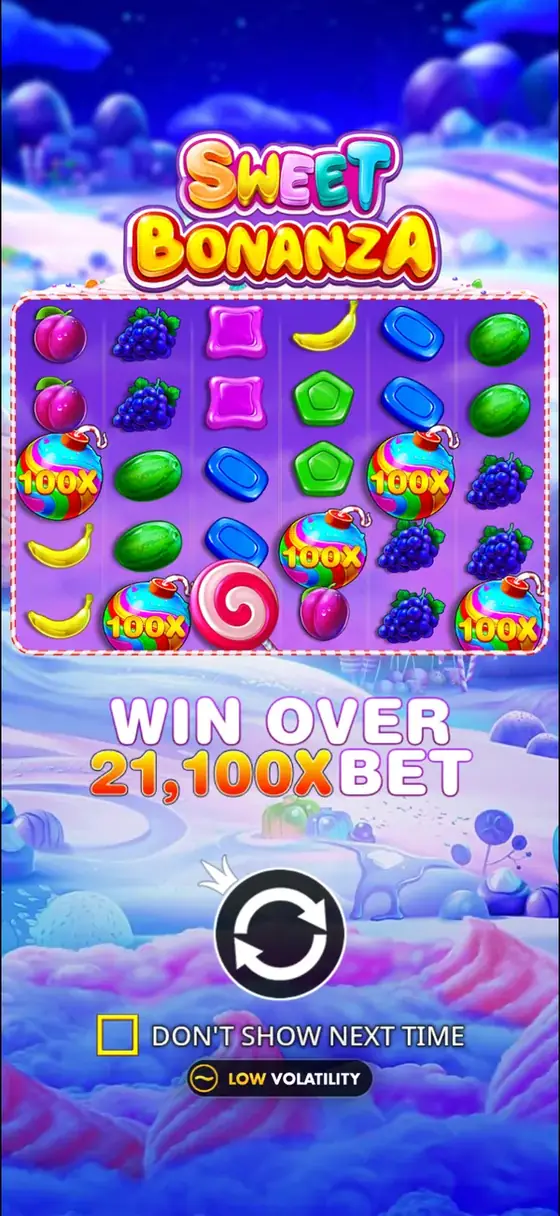
Playing Sweet Bonanza on a mobile device provides the same core gameplay as the desktop version. The 6x5 grid, cluster pays mechanic, and Tumble feature are fully functional on smartphones and tablets. This page details the practical aspects of mobile play, from accessing the game to optimizing performance and settings for a smooth experience.
The game's medium-high volatility and potential for a 21,100x max win remain unchanged on mobile. Understanding how the interface adapts to smaller screens and touch controls can help players focus on the game's mechanics, such as triggering the free spins round with four or more scatter symbols.
Browser Play Versus Casino Apps
You can access Sweet Bonanza on mobile in two primary ways. The first is through a mobile web browser. Most online casinos have websites that adapt their game libraries for mobile use. This method requires no download and allows instant play. The game loads directly in the browser using HTML5 technology, which is standard for modern slots from Pragmatic Play.
The second method is via a dedicated casino application available for download from official app stores. These apps are designed specifically for mobile operating systems and may offer faster loading times or integrated features like secure login. Whether using a browser or an app, the game's rules, RTP of 96.51%, and features like the Ante Bet and Buy feature for free spins are identical.
iOS and Android Compatibility
Sweet Bonanza is compatible with both iOS and Android operating systems. The game is built on a platform that supports these systems without requiring different versions. For iOS devices like iPhones and iPads, the game runs on Safari and within casino apps available on the App Store. Android users can play on Chrome or other browsers and through apps from the Google Play Store or other sources.
Performance is generally consistent across modern devices. The game's colorful candy and fruit symbols and animated tumble sequences display correctly. Older devices with less processing power may experience slower loading times or occasional frame rate drops during complex tumble chains, but the gameplay mechanics are not affected.
Portrait and Landscape Layout
The game interface automatically adjusts between portrait and landscape orientations. In landscape mode, the 6x5 grid is larger and more central, similar to the desktop view. This layout provides a comprehensive view of the reels and the game controls, which are typically arranged along the bottom.
Portrait mode rotates the display to fit the natural holding position of a phone. In this view, the grid may appear slightly smaller, and game controls are often rearranged or placed in a collapsible menu to save screen space. Some players prefer portrait for one-handed play, while others choose landscape for a wider view of the tumble sequences and multiplier bombs during free spins.
Mobile Performance, Settings, and Data
Sweet Bonanza is not a graphically intensive game, but its smooth animations for tumbles and wins require consistent processing. Playing for extended sessions can increase battery consumption. It is advisable to ensure your device is charged or plugged in during long play.
Data usage is moderate. Loading the game for the first time in a browser or app requires downloading game assets, which may use 50-100 MB of data. Subsequent sessions use far less data to communicate spin outcomes and update balances. Playing on a Wi-Fi connection can conserve mobile data and often provides a more stable connection, which is important for real-money play.
Access the game settings by tapping the menu or information icon, typically represented by an 'i' or three lines. Key settings to consider include sound effects and music, which can be toggled on or off. A Turbo Spin or Fast Play mode speeds up the spin animation and tumble sequences, allowing for more spins per minute.
You can also set limits for the Autoplay feature where it is offered, such as a loss limit or a single win limit. The Ante Bet setting, which increases the bet by 25% to double the chance of triggering free spins, can be enabled or disabled here. Note that enabling Ante Bet deactivates the Buy feature for free spins.
Comparing Desktop and Mobile Play
The following table outlines the primary differences between playing Sweet Bonanza on a desktop computer and on a mobile device.
| Aspect | Desktop Play | Mobile Play |
|---|---|---|
| Access Method | Web browser on computer | Mobile browser or dedicated app |
| Controls | Mouse and keyboard | Touch screen gestures |
| Screen Layout | Fixed, wide layout | Adapts to portrait or landscape |
| Portability | Stationary | Fully portable |
| Connection | Typically stable wired/Wi-Fi | Can use mobile data or Wi-Fi |
| Core Gameplay | Full RTP, features, max win | Identical to desktop version |
Safe and Responsible Play on a Phone
The convenience of mobile play requires heightened attention to responsible gambling practices. The ease of access can lead to longer, unplanned sessions. Use the tools available in the game settings, such as session time reminders or autoplay limits. Many casino apps and websites also provide deposit limits and self-exclusion options in their account settings.
Ensure you are playing on a secure internet connection, especially when playing for real money. Avoid using public Wi-Fi for financial transactions. Keep your device's operating system and any casino apps updated to the latest version for security patches. Real-money play should only be conducted at licensed operators.
Sweet Bonanza: questions and answers
Do I need to download an app to play Sweet Bonanza on my phone?
No, a download is not strictly necessary. You can play Sweet Bonanza directly through the mobile website of most online casinos using your phone's browser. Dedicated casino apps are an alternative that may offer optimized performance.
Is the game experience different on mobile compared to desktop?
The core game is identical. The RTP of 96.51%, medium-high volatility, 6x5 grid, cluster pays, and all bonus features like Tumbles and free spins are the same. The main differences are the touch-based controls and the adaptable screen layout.
Can I switch between portrait and landscape mode while playing?
Yes. The game will automatically reorient itself when you rotate your device. Your game session and balance are maintained during the switch.
Does playing on mobile use a lot of data?
Initial loading uses the most data, potentially 50-100 MB. After that, data usage per spin is minimal as only the outcome and updated balance are transmitted. Playing on Wi-Fi is recommended to conserve mobile data.
Are all the game settings available on the mobile version?
Yes. Key settings like sound toggle, turbo spin, autoplay limits, and the Ante Bet option are accessible through the in-game menu, typically via an information or settings icon on the main screen.
Is it safe to play Sweet Bonanza for real money on a mobile device?
Safety depends on playing via a secure connection and using licensed operators. Ensure your device is secure, use strong passwords, and avoid public Wi-Fi for financial transactions. Utilize responsible gambling tools provided by the casino.